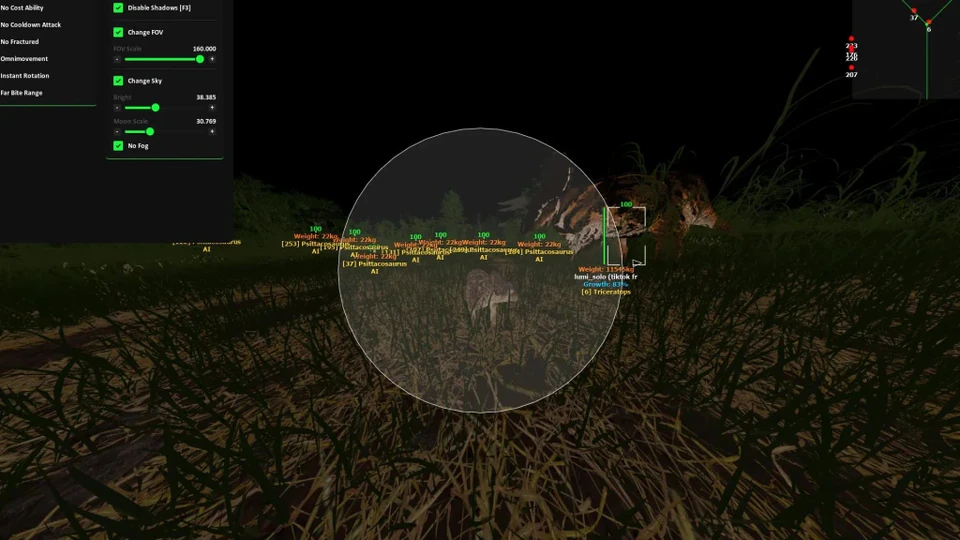
Tune Bite Assist and ESP in Practice Before Official
How to tune The Isle Bite Assist and ESP overlays in practice sessions — smoothness, FOV and readable wallhack without Official risk.
This guide is only about tuning overlays and Bite Assist in practice. It is not the drill curriculum (practice checklist) and not the risk article (practice safely). Stay in Community or singleplayer until settings feel human.
ESP first, assist second
Load Lite-style vision: boxes, distance, growth and nest labels at mid range. Confirm you can glance and look away. Full wallhack tuning is in ESP wallhack setup.
Bite Assist smoothness ladder
Start high smoothness, mid FOV. Lower smoothness one notch only after chase tracking looks natural for a full minute. Species splits belong in bite assist combat; Official-safe defaults are in bite assist for Official.
Sticky Target and Hit Priority in practice
Enable Sticky Target during pack peels, disable it while nesting or drinking. Hit Priority should prefer closest or low-HP dinosaurs — test both and note which creates fewer camera yanks in grass.
Radar opacity
Keep radar small and dim during fights. Match radius to ESP distance so both tools agree — see radar hack guide.
- Save a “Practice Soft” profile separate from Official
- Never export max sliders from practice into Official
- Re-test after every loader update
- Record one minute of chase to judge snap look