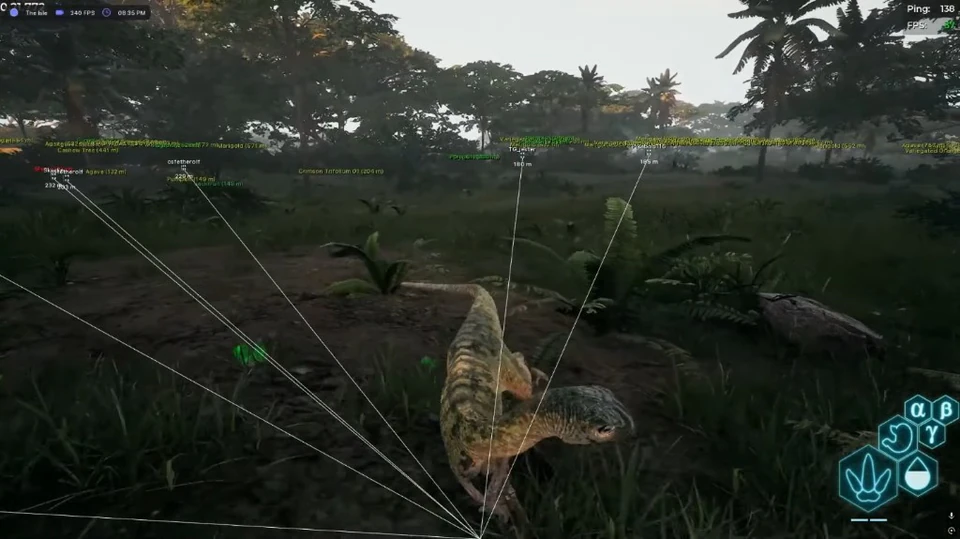
The Isle ESP Wallhack Setup for Official Servers
Configure The Isle ESP wallhack for EVRIMA and Legacy — boxes, skeletons, growth, weight and nest labels that stay readable on Official.
The Isle ESP wallhack is the foundation of Lite. On Official, dense jungle and night fog punish players who rely on audio alone. This setup guide focuses on readable overlays for Steam EVRIMA and Legacy — not max sliders that paint every AI dinosaur on the map.
Start with player boxes and distance
Enable player boxes, name tags and distance first. Cap render distance around mid-range so distant AI does not clutter the frame. Add skeletons only after you can track boxes without staring at the overlay during chases.
Weight, growth and species readouts
Growth percent and weight tell you whether a silhouette is a free kill or an apex threat. Turn species labels on for Legacy mixed lobbies where juveniles and adults share the same clearing. Color-code hostiles so pack mates do not look identical to strangers.
Nest, carcass and food ESP
Nest markers and carcass labels shorten starve cycles. Keep fruit and herb tags at a shorter radius than player ESP so food noise does not hide approaching hunters. Water markers help herbivores plan safe drink routes between fights.
Official-safe defaults
- Use portal Official presets before custom max ranges
- Disable alerts that spam every AI footstep
- Test stream-proof if you capture with OBS
- Recheck the status banner after every EAC or game patch
Lite ships this vision stack. Add Bite Assist later with Pro if you want combat modules on top of wallhack.